Info
ansible 을 설치하고 배포해보는 실습을 진행한 페이지입니다. (Docker 는 설치되어 있다는 가정입니다.)
1. ansible 설치
먼저 필자는 macbook 을 활용하기 때문에 homebrew 로 ansible 을 설치해주었습니다.
# homebrew 확인
brew --version

# ansible 설치
brew install ansible

# 버전 확인
ansible --version

ansible [core 2.18.8]
  config file = None
  configured module search path = ['/Users/dong-gu/.ansible/plugins/modules', '/usr/share/ansible/plugins/modules']
  ansible python module location = /opt/homebrew/Cellar/ansible/11.9.0_1/libexec/lib/python3.13/site-packages/ansible
  ansible collection location = /Users/dong-gu/.ansible/collections:/usr/share/ansible/collections
  executable location = /opt/homebrew/bin/ansible
  python version = 3.13.7 (main, Aug 14 2025, 11:12:11) [Clang 17.0.0 (clang-1700.0.13.3)] (/opt/homebrew/Cellar/ansible/11.9.0_1/libexec/bin/python)
  jinja version = 3.1.6
  libyaml = True
project 디렉토리 생성
mkdir ansible-docker-test
cd ansible-docker-test

# ssh key 넣어둘 하위 디렉토리 생성
mkdir ssh-keys
ssh-key 복사
cp ~/.ssh/id_ed25519* ~(경로)/ansible-docker-test/ssh-keys

# 확인
❯ ls
id_ed25519     id_ed25519.pub
2. 웹서버 3개 생성
docker-compose 를 통해서 웹서버를 생성해줍니다. 아래와 같은 설정이 들어있습니다.
- ansible 컨트롤러 : ansible 이 설치된 이미지 사용
- 웹서버 : ssh 서버 설치, python 설치, tial -f /dev/null 통해 컨테이너 명령 실행 후 종료 방지
- network 설정 : 같은 네트워크로 설정해서 검색이 가능하도록 하였습니다.
- ‘YOUR_PUBLIC_KEY_HERE’ 에는 실제 공개키를 넣어줍니다.
version: '3.8'

services:
  ansible-controller:
    image: cytopia/ansible:latest
    container_name: ansible-controller
    working_dir: /ansible
    volumes:
      - ./ansible:/ansible
      - ./ssh-keys:/home/dong-gu/.ssh
    networks:
      - ansible-net
    tty: true
    stdin_open: true
    command: |
      sh -c "
        apk add --no-cache openssh-client &&
        adduser -D dong-gu &&
        chown -R dong-gu:dong-gu /home/dong-gu &&
        chmod 600 /home/dong-gu/.ssh/id_ed25519 &&
        tail -f /dev/null
      "

  web-server-1:
    image: ubuntu:24.04
    container_name: web-server-1
    networks:
      - ansible-net
    command: |
      bash -c "
        apt-get update &&
        apt-get install -y openssh-server python3 sudo &&
        adduser --disabled-password --gecos '' dong-gu &&
        usermod -aG sudo dong-gu &&
        mkdir -p /home/dong-gu/.ssh &&
        echo 'YOUR_PUBLIC_KEY_HERE' > /home/dong-gu/.ssh/authorized_keys &&
        chown -R dong-gu:dong-gu /home/dong-gu/.ssh &&
        chmod 700 /home/dong-gu/.ssh &&
        chmod 600 /home/dong-gu/.ssh/authorized_keys &&
        service ssh start &&
        tail -f /dev/null
      "

  web-server-2:
    image: ubuntu:24.04
    container_name: web-server-2
    networks:
      - ansible-net
    command: |
      bash -c "
        apt-get update &&
        apt-get install -y openssh-server python3 sudo &&
        adduser --disabled-password --gecos '' dong-gu &&
        usermod -aG sudo dong-gu &&
        mkdir -p /home/dong-gu/.ssh &&
        echo 'YOUR_PUBLIC_KEY_HERE' > /home/dong-gu/.ssh/authorized_keys &&
        chown -R dong-gu:dong-gu /home/dong-gu/.ssh &&
        chmod 700 /home/dong-gu/.ssh &&
        chmod 600 /home/dong-gu/.ssh/authorized_keys &&
        service ssh start &&
        tail -f /dev/null
      "

networks:
  ansible-net:
    driver: bridge
실행
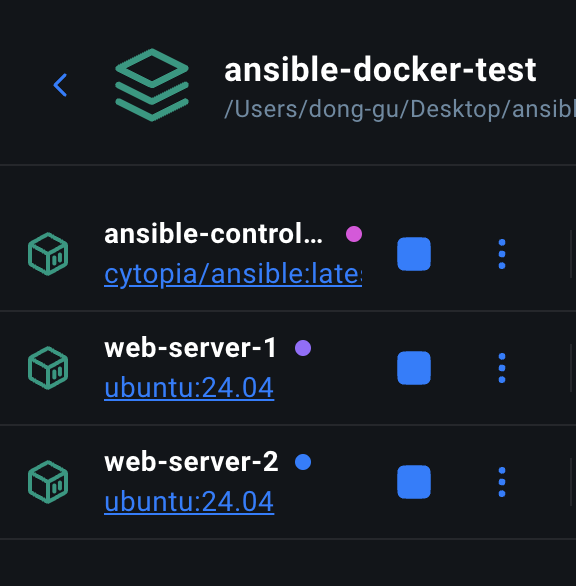
docker-compose up -d결과

3. ansible 설정
ansible-docker-test 폴더 하위에 ansible 설정 파일용 폴더를 생성해줍니다.
mkdir ansibleinventory 설정
[webservers]
web-server-1
web-server-2

[webservers:vars]
ansible_user=dong-gu
ansible.cfg 설정
[defaults]
inventory = hosts.ini
host_key_checking = False
remote_user = dong-gu
private_key_file = /home/dong-gu/.ssh/id_ed25519  # dong-gu 경로로!
테스트
docker exec -it ansible-controller ansible all -m ping결과
❯ docker exec -u dong-gu -it ansible-controller ansible all -m ping
[WARNING]: Platform linux on host web-server-1 is using the discovered Python interpreter at /usr/bin/python3.12, but future installation
of another Python interpreter could change the meaning of that path. See https://docs.ansible.com/ansible-
core/2.17/reference_appendices/interpreter_discovery.html for more information.
web-server-1 | SUCCESS => {
    "ansible_facts": {
        "discovered_interpreter_python": "/usr/bin/python3.12"
    },
    "changed": false,
    "ping": "pong"
}
[WARNING]: Platform linux on host web-server-2 is using the discovered Python interpreter at /usr/bin/python3.12, but future installation
of another Python interpreter could change the meaning of that path. See https://docs.ansible.com/ansible-
core/2.17/reference_appendices/interpreter_discovery.html for more information.
web-server-2 | SUCCESS => {
    "ansible_facts": {
        "discovered_interpreter_python": "/usr/bin/python3.12"
    },
    "changed": false,
    "ping": "pong"
}
What's next:
    Try Docker Debug for seamless, persistent debugging tools in any container or image → docker debug ansible-controller
    Learn more at https://docs.docker.com/go/debug-cli/